ブランチの作成
プル要求を開く前に、変更を処理する別の場所のブランチを作成します。
メモ
書き込みアクセス権を持つリポジトリにのみブランチを作成できます。
ブランチ概要からのブランチ作成
-
GitHub で、リポジトリのメイン ページに移動します。
-
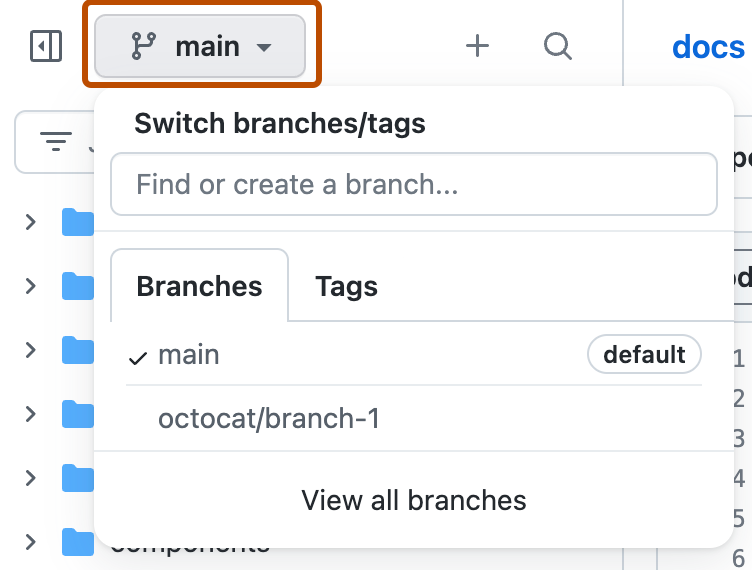
左側のファイル ツリー ビューで、 ブランチ ドロップダウン メニューを選んでから、[View all branches] をクリックします。 統合ファイル エディターの上部にあるブランチ ドロップダウン メニューも見つかります。
-
[新しいブランチ] をクリックします。
![リポジトリの [ブランチ] ページのスクリーンショット。 [新しいブランチ] というラベルが付いた緑色のボタンがオレンジ色の枠線で強調表示されています。](/assets/cb-31579/images/help/branches/new-branch-button.png)
-
[新しいブランチ名] に、ブランチの名前を入力します。
-
[ソース] で、新しいブランチのベースとなるブランチを選択します。
-
[ 新しいブランチの作成] をクリックします。

![リポジトリの [ブランチ] ページのスクリーンショット。 [新しいブランチ] というラベルが付いた緑色のボタンがオレンジ色の枠線で強調表示されています。](/assets/cb-31579/mw-1440/images/help/branches/new-branch-button.webp)
ブランチ ドロップダウンを使用してブランチを作成する
-
GitHub で、リポジトリのメイン ページに移動します。
-
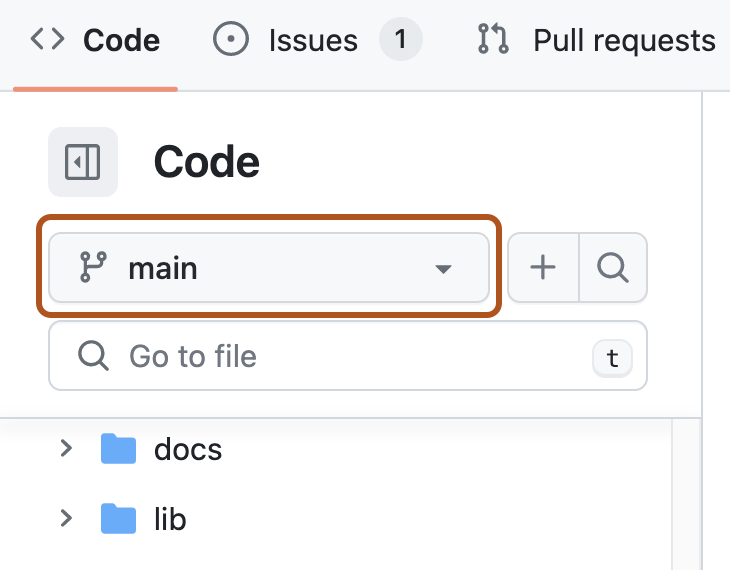
ブランチ ドロップダウン メニュー、ファイル ツリー ビュー、または統合ファイル エディターの上部を選択します。
-
必要に応じて、リポジトリの既定のブランチ以外のブランチから新しいブランチを作成するには、別のブランチをクリックします。 次に、ブランチのドロップダウン メニューをもう一度選択します。
-
[ブランチの検索または作成...] テキスト フィールドに新しいブランチの一意の名前を入力し、 [ブランチの作成] をクリックします。
![ブランチ セレクターのドロップダウン メニューのスクリーンショット。 [ブランチの作成: new-branch] がオレンジ色の枠線で強調表示されています。](/assets/cb-28640/images/help/branches/create-branch-text.png)

![ブランチ セレクターのドロップダウン メニューのスクリーンショット。 [ブランチの作成: new-branch] がオレンジ色の枠線で強調表示されています。](/assets/cb-28640/mw-1440/images/help/branches/create-branch-text.webp)
Issueのためのブランチの作成
問題ページから直接問題に対応するブランチを作成できます。 「Issueの作業のためのブランチの作成」を参照してください。
ブランチの削除
マージ済みまたは完了した作業用のブランチなど、不要になったブランチを削除します。
プルリクエストがリポジトリにマージされた後、head ブランチを自動的に削除することができます。 「ブランチの自動削除を管理する」を参照してください。
メモ
削除するブランチがリポジトリの既定のブランチである場合は、最初に新しい既定のブランチを選択します。 「デフォルトブランチを変更する」を参照してください。
ブランチがオープン プル要求に関連付けられている場合は、ブランチを削除する前にプル要求をマージまたは閉じます。
-
GitHub で、リポジトリのメイン ページに移動します。
-
左側のファイル ツリー ビューで、 ブランチ ドロップダウン メニューを選んでから、[View all branches] をクリックします。 統合ファイル エディターの上部にあるブランチ ドロップダウン メニューも見つかります。
-
削除するブランチの横にある [ ] をクリックします。

-
ブランチが少なくとも 1 つのオープン pull request に関連付けられている場合、ブランチを削除するとプル要求が閉じます。 警告を読んだら [削除] をクリックします。

プルリクエストがマージされた後にheadブランチを削除すると、GitHubは同じリポジトリ内に削除されたブランチをベースブランチと指定しているオープンなプルリクエストがないかをチェックします。 GitHubはそういったプルリクエストを自動的に更新し、ベースブランチをマージされたプルリクエストのベースブランチに変更します。 「支店」を参照してください。